Puppeteer Browser Pool for CPU and Memory Managment
Project Details
A browser pool in an javascript async environment
Skills
Tools
Headless Browser Pool with Puppeteer
Project Overview
I am developing a robust headless browser pool service using Puppeteer, designed to efficiently manage browser instances and page loads to prevent server overload. This project focuses on optimizing resource allocation and ensuring high-throughput page acquisition for backend services. The goal is to provide a scalable and reliable solution for applications that require frequent web page interactions, such as web scraping, automated testing, and content aggregation.
Problem Identification
A critical performance bottleneck was identified in our backend service. Due to unrestricted browser and page management, the service could launch an unlimited number of browsers and open an unmanaged quantity of pages. While we had methods to close pages, abandoned browser instances remained, consuming significant server memory and CPU resources. This uncontrolled resource consumption resulted in unpredictable server load spikes, impacting service stability and performance. Without proper management, the service was prone to crashing or becoming unresponsive during periods of heavy usage.
Goal & Process
The primary objective of this project is to create a browser pool service that effectively manages the server's page and browser load. This involves implementing a system that:
Controls the number of active browser instances.
Limits the number of pages open per browser.
Efficiently queues and processes page requests.
Automatically shuts down idle browser instances to conserve resources.
Provides monitoring and health check endpoints for real-time observability.
The core components of this browser pool service include a distributed, rate-limited Puppeteer browser/page pool with a Redis-backed semaphore and FIFO queue. Single-process safety is ensured via an in-process mutex, and multi-process safety is guaranteed through Redis keys. The design prioritizes high-throughput page acquisition, fair queuing, robust teardown, and idle-cost control.
Project Impact
This module provides a distributed, rate-limited Puppeteer browser/page pool with a Redis-backed semaphore and FIFO queue. The system is designed for high-throughput page acquisition, fair queuing, robust teardown, and idle-cost control. Here’s a concise, engineer-to-engineer description:
What this module is:
A distributed, rate-limited Puppeteer browser/page pool with Redis-backed semaphore and FIFO queue.
Single-process safety via an in-process mutex; multi-process safety via Redis keys.
Focus: high-throughput page acquisition, fair queuing, robust teardown, and idle-cost control.
Core concepts:
Global capacity control (Redis):
browserpool:semaphore:inuse is a Redis Set of “page tokens”. Its cardinality is the single source of truth for total pages in use across all app instances.
browserpool:queue:waiters is a Redis List holding waiter IDs (FIFO) when capacity is full.
browserpool:waiter:<id> holds the waiter’s token; <key>:notify is a short-lived list used to wake that waiter.
Local pool state (per Node process):
A pool of Browser entries: { browser, openPages, pendingPages, lastUsedAt, idleTimer, pages }
pendingPages represents “reserved but not yet opened” pages to prevent races and over-allocation.
totalOpenPages, totalPendingPages, launchesInFlight are local counters for observability and launch throttling.
A Mutex (async-mutex) serializes any operations that must be atomic within the process (choosing a browser, mutating counters, adding/removing from the pool, scheduling idle shutdown).
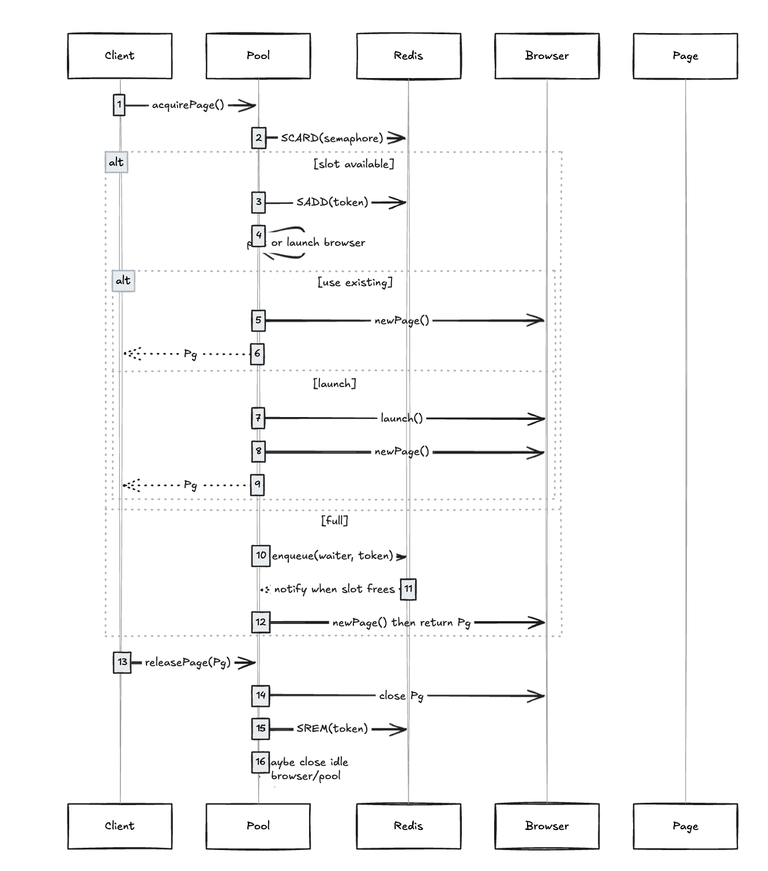
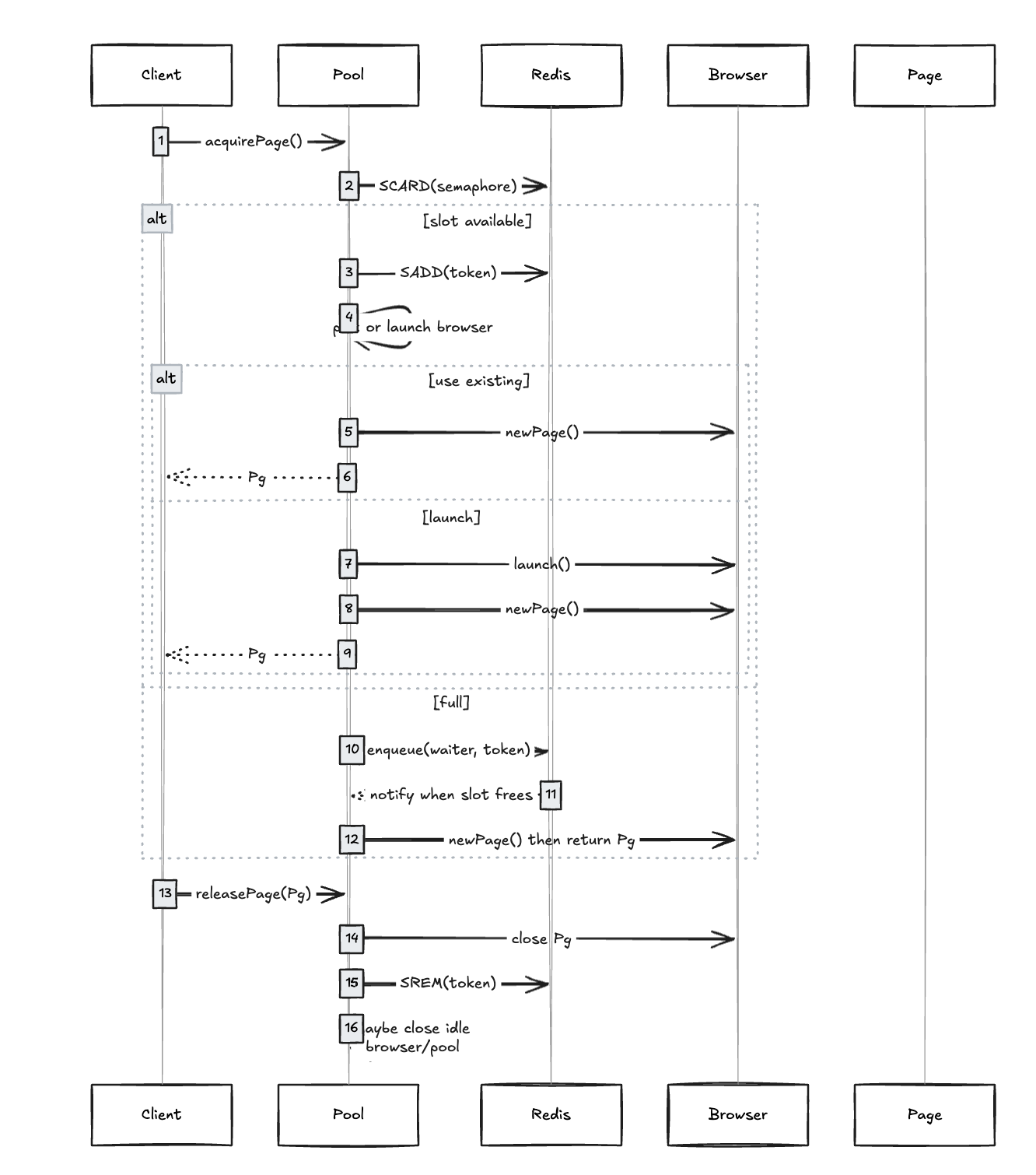
Acquire flow (BrowserPool.acquirePage):
Fast path: If Redis semaphore size < pageLimit
Reserve capacity by SADD-ing a unique token to the semaphore.
Allocate a page locally using that token (allocatePageWithToken).
Slow path (at capacity):
Enqueue a waiter: store token, RPUSH waiter ID, and BRPOP on its notify list.
A background queue server (serveQueue) pops waiters and grants capacity when Redis shows free slots.
Once woken, proceed to allocate with the pre-assigned token.
Allocate with token (allocatePageWithToken):
Phase 1 (under mutex): Decide a plan
Prefer an existing browser whose openPages + pendingPages < perBrowserPageLimit.
If none and pool size allows, reserve a “launch slot” (launchesInFlight++).
Otherwise, backoff briefly and retry.
Phase 2 (outside mutex):
For “use-browser”: call browser.newPage() with timeout protection.
For “launch”: puppeteer.launch(launchOptions), then immediately reserve one pending page on the new browser.
Phase 3 (under mutex): Commit
Attach the token to the created Page (WeakMap<Page, token>), update open/pending counters, track in entry.pages, refresh lastUsedAt, and cancel pool idle shutdown if needed.
Error handling:
If newPage or launch fails, roll back pending reservations and counters; if a just-launched browser has no pages, close and remove it. Redis token removal is handled by the caller or disconnect handler.
Release flow (releasePage):
Under mutex:
Remove the Page from its browser entry and close it.
Decrement open counters; if browser is now idle, schedule per-browser idle close.
Always:
Remove the exact token mapped to that Page from the Redis semaphore (no random SPOP; avoids mismatches).
Trigger serveQueue to wake the next waiter.
Consider scheduling a pool-wide idle shutdown if no pages remain.
Idle management and cost control:
Per-browser idle TTL: when a browser’s openPages drops to 0, schedule a close after idleBrowserTTL unless new work arrives.
Pool idle TTL: if totalOpenPages becomes 0, schedule closing all browsers after idlePoolTTL.
Both are canceled automatically if new activity appears.
Fair queuing and correctness guarantees:
Global page limit is enforced by Redis set size; all processes observe the same capacity.
FIFO fairness via Redis list for waiters.
Page-token mapping (WeakMap<Page, token>) guarantees we only remove the correct token upon release, even across failures.
pendingPages prevents oversubscription within a single browser when multiple acquisitions race.
launchesInFlight avoids “over-launch storms.”
Failure resilience:
withTimeout guards Puppeteer’s newPage to prevent hangs.
onBrowserDisconnected cleans up:
Removes all tokens associated with pages from that browser in Redis.
Adjusts local counters (open and pending) and removes the browser from the pool.
Serves the queue afterward so capacity is immediately reused.
Extensive logging at info/warn/debug levels for observability and incident triage.
Monitoring endpoints:
getPoolStatus: returns a snapshot including pool size, limits, counters, per-browser stats, Redis in-use count, and queue length.
getPoolHealth: basic anomaly detection (e.g., local > max, Redis > max, Redis < local).
Tuning knobs (from config):
poolNumber: max concurrent Browser instances.
pageLimit: global max pages across all processes (enforced via Redis).
perBrowserPageLimit: derived cap per browser to spread load.
idleBrowserTTL, idlePoolTTL: cost/latency trade-offs.
newPageTimeout: fail-fast on stuck page creation.
launchOptions: passed to puppeteer.launch.
debugLogging: verbose diagnostics.
Why this design:
Scales horizontally: multiple app instances coordinate via Redis without double-counting.
Prevents thundering herd: launchesInFlight + backoff + pending reservations.
Minimizes token leaks: strict token binding to pages and cleanup on release/disconnect.
Cost-efficient: aggressively closes idle resources yet keeps fast path hot when under load.
How to explain in a demo: "We use Redis as a distributed semaphore to cap total pages. If capacity is full, callers queue in FIFO and are awakened when a slot frees up. Inside each process, we keep a small pool of Chromium instances and balance new pages across them, reserving ‘pending’ slots to avoid races. We also auto-shutdown idle browsers and even the whole pool to save memory/CPU. Failures like browser crashes are detected; we reclaim tokens, adjust counters, and continue serving the queue."
Next Project
